Redirect-only or proxy site Setup
Requires a server to be provisioned.
Resources used
When is this necessary
If the domain is not managed by CloudFlare, and you need to redirect from one domain to another, or you need to proxy to another service or server.
Steps
- On the site in Forge which you'd like to have a domain redirect to, navigate to the Domains tab
- Update existing content-serving sites
- The primary site, and any secondary sites need to have this change
- For example, Crawford Hoying has a single Craft install with multiple sites. Custom domains all use the same Craft install.
- At the top of the Domains page, click "Edit Nginx configuration"
- Switch to the config file for the main site
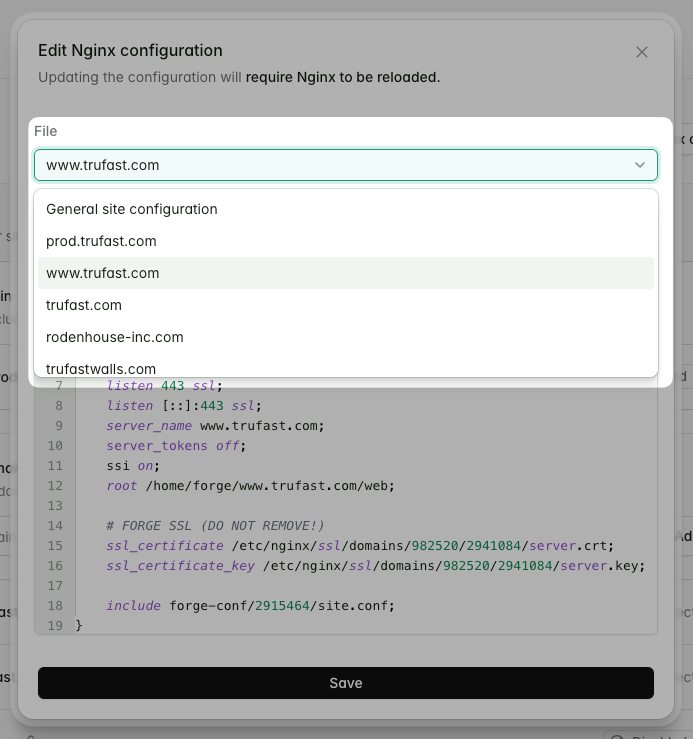
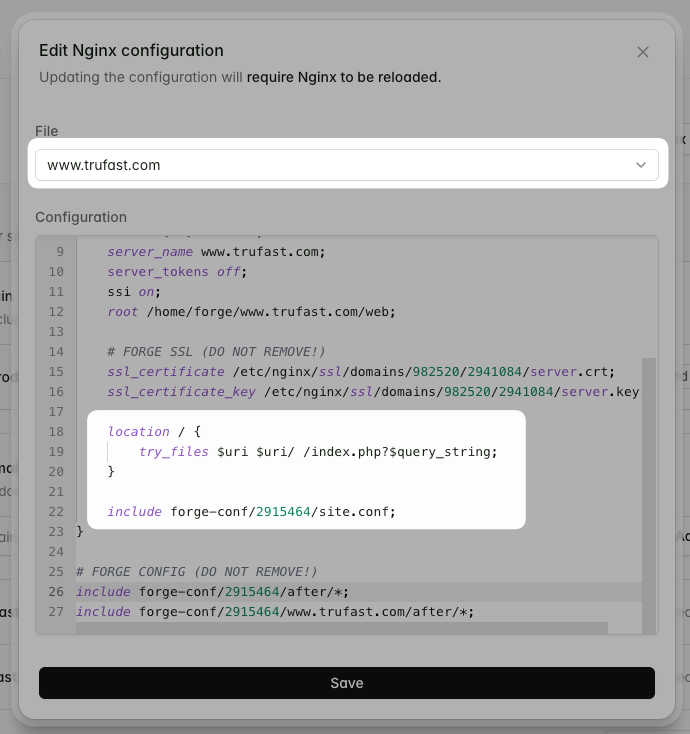
- Above the line that says something similar to
include forge-conf/<site id>/site.conf;, and below the SSL config, add the followinglocationblocklocation / { try_files $uri $uri/ /index.php?$query_string; } - That section of config should now look similar to
this
- Save the config
- ❗️This is important because switching to another config file will cause the changes to be lost
- Repeat steps 3.2 to 3.6 for every domain that needs to serve regular content
- Note that at this point the Nginx service hasn't actually reload because the config is technically incorrect. The next steps will fix this.
- The primary site, and any secondary sites need to have this change
- Enable redirects in the general nginx config
- At the top of the Domains page, click "Edit Nginx configuration"
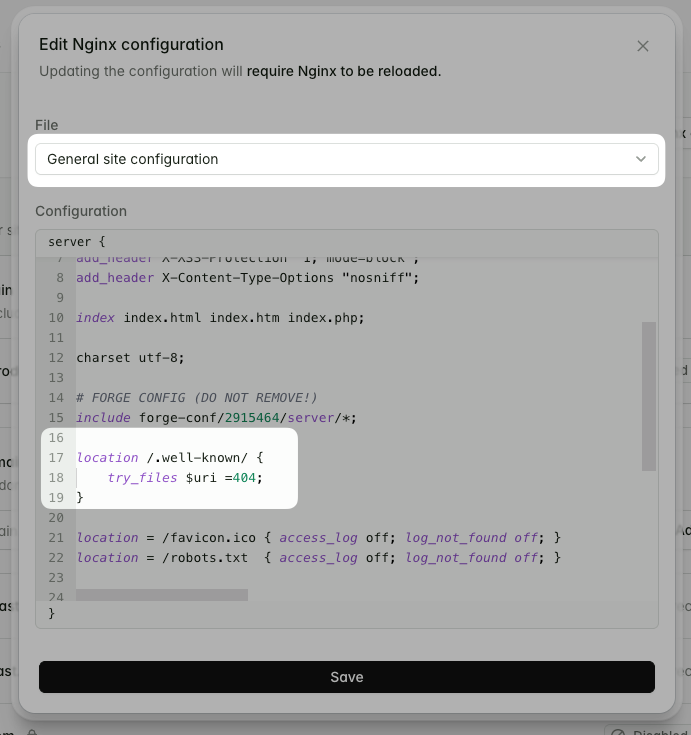
- The modal will have "General site configuration" already selected
- Replace the
location /block with the followinglocation /.well-known/ { try_files $uri =404; } - That section of config should now look similar to this
- Save the config
- ❗️This is important because switching to another config file will cause the changes to be lost
- At this point the nginx service should reload without issue, and the main and secondary sites should be serving traffic correctly
- Configure the redirect on the new domain
- Add a new Custom domain, with relevant settings (usually the defaults are
fine)
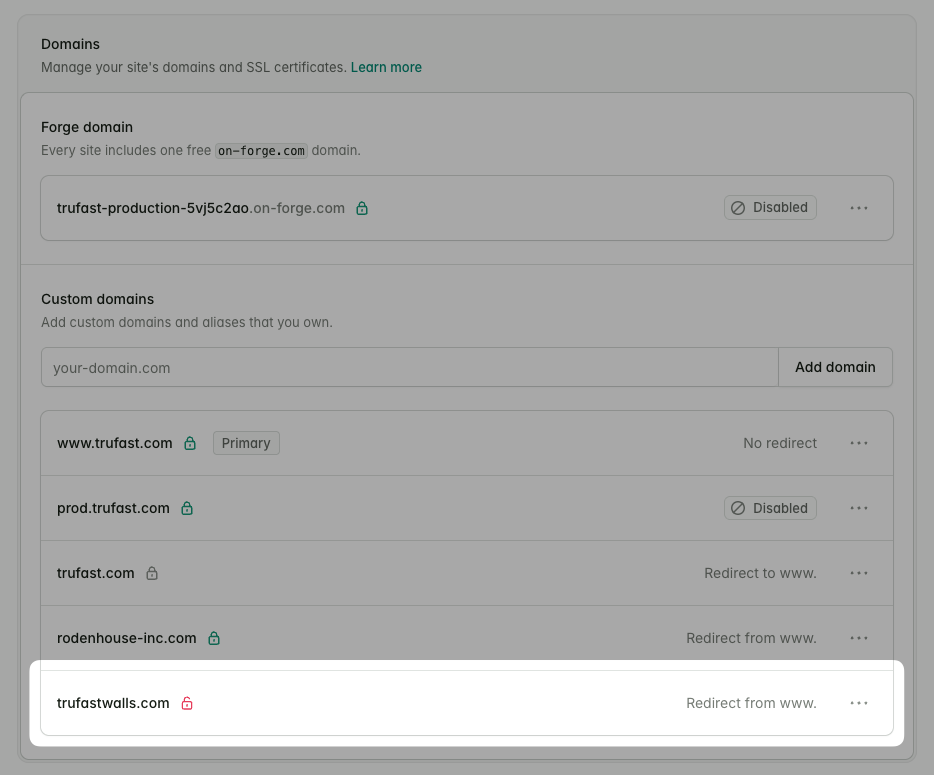
- The domain will be provisioned without SSL enabled, this is fine.
- Click "Edit Nginx configuration" again
- Switch to the config file for the domain you want to redirect
from
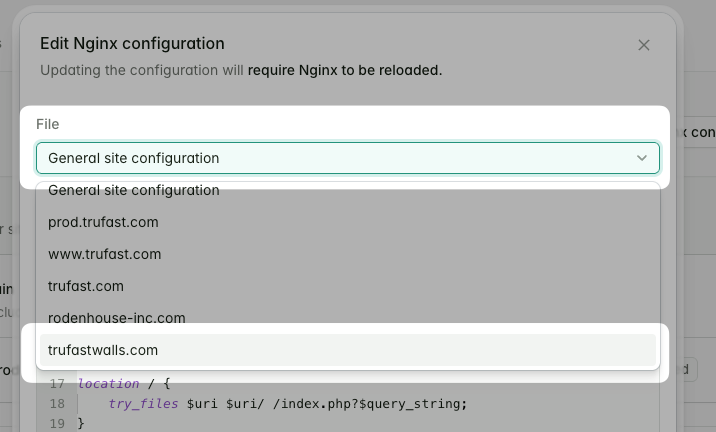
- Above the line that says something similar to
include forge-conf/<site id>/site.conf;, and below the SSL config (this might be commented out still, that's OK), add thelocationblock to return redirects, replacingwww.mydomain.comwith the target domainlocation / { return 301 https://www.mydomain.com$request_uri; } - That section of config should now look similar to this
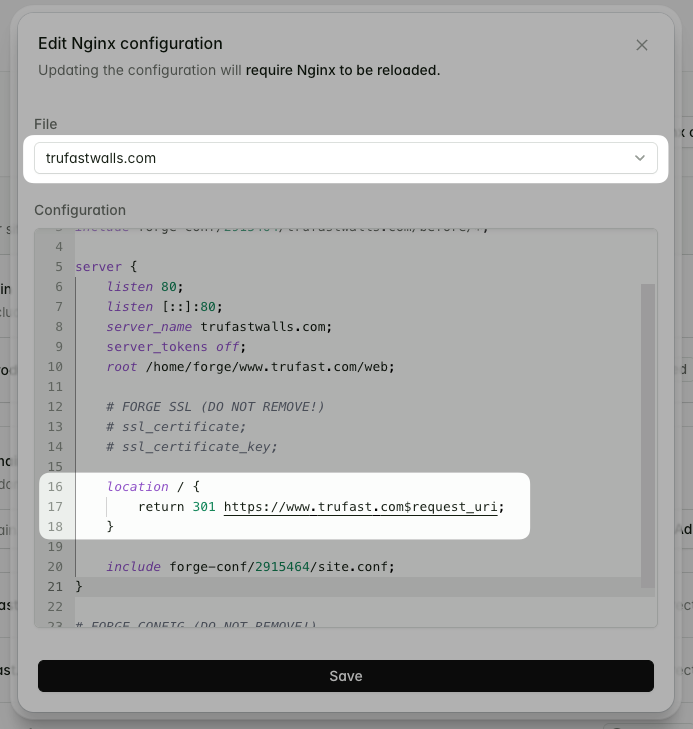
- Save the config
- ❗️Confirm the main site (and any secondary sites) are still working correctly
- Add a new Custom domain, with relevant settings (usually the defaults are
fine)
- Provision SSL
- At the bottom of the Domains page, click "Add certificate"
- Choose LetsEncrypt
- We wouldn't choose others, because if we had CloudFlare in front of the domain, we'd be able to use their redirects instead.
- Select the domain
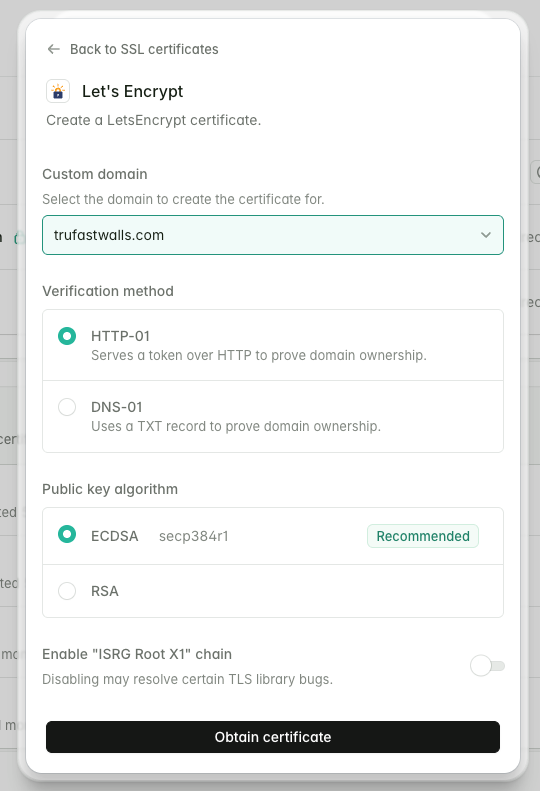
- Click "Obtain certificate"
- It should succeed and activate automatically
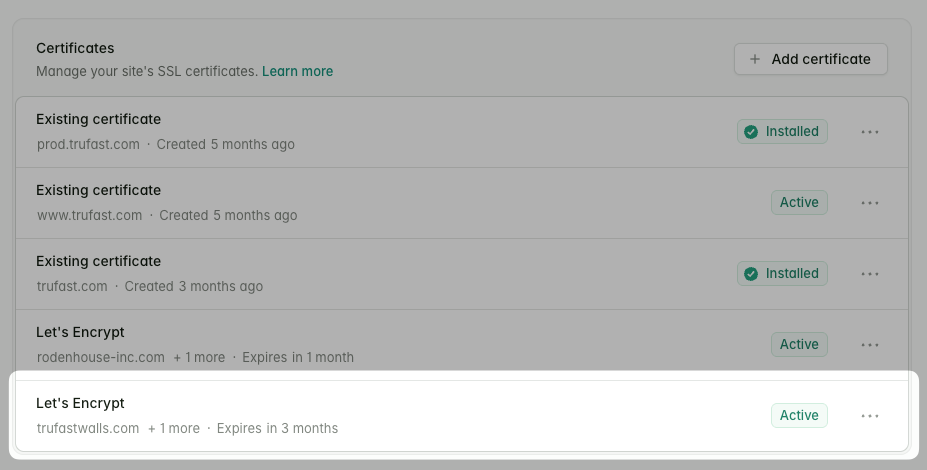
- At this point you can confirm that the redirect is working
curl -I https://trufastwalls.com                                                                                                                                                                                                                                              ~
HTTP/2 301
server: nginx
date: Thu, 26 Mar 2026 08:37:52 GMT
content-type: text/html
content-length: 162
--> location: https://www.trufast.com/ <-- Expecting a location header
x-frame-options: SAMEORIGIN
x-xss-protection: 1; mode=block
x-content-type-options: nosniff
Notes
Ensuring www. redirects correctly
Sometimes, after updating the redirect-only configs, the domains only redirect for request to the root domain, not the www. domain.
To resolve this, edit the Nginx config for that domain, and include the www. domain in the server_name list.
For example: 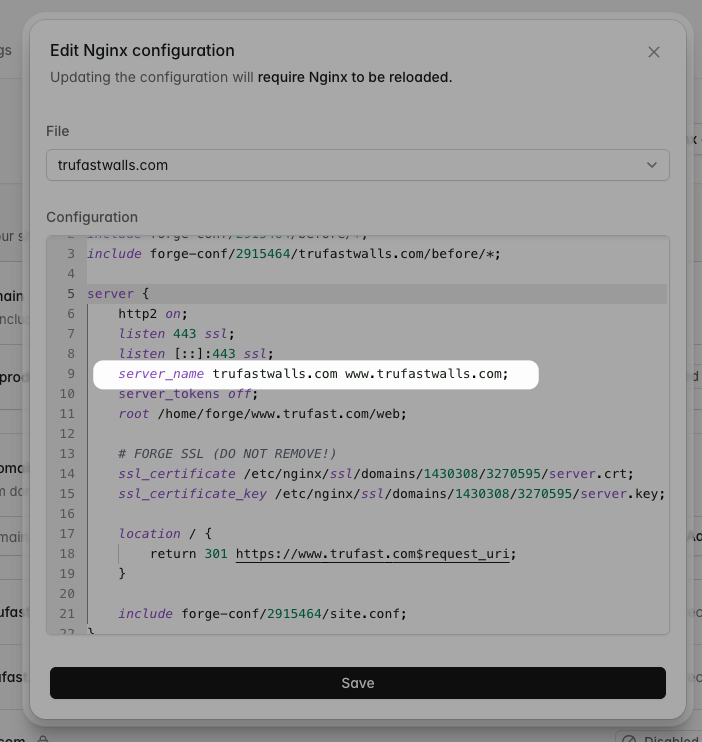
Checking Nginx status
If you need to manually confirm that Nginx is running, or has reloaded successfully:
SSH onto the server and run sudo systemctl status nginx
- When prompted for the password, use the sudo password stored for the project in Bitwarden
If it's running properly, you'll see output like this:
forge@trufast-production:~$ sudo systemctl status nginx
● nginx.service - A high performance web server and a reverse proxy server
     Loaded: loaded (/usr/lib/systemd/system/nginx.service; enabled; preset: enabled)
     Active: active (running) since Thu 2026-03-26 08:37:28 UTC; 19min ago
       Docs: man:nginx(8)
    Process: 4155114 ExecStartPre=/usr/sbin/nginx -t -q -g daemon on; master_process on; (code=exited, status=0/SUCCESS)
    Process: 4155116 ExecStart=/usr/sbin/nginx -g daemon on; master_process on; (code=exited, status=0/SUCCESS)
    Process: 4156422 ExecReload=/usr/sbin/nginx -g daemon on; master_process on; -s reload (code=exited, status=0/SUCCESS)
   Main PID: 4155117 (nginx)
      Tasks: 5 (limit: 9488)
     Memory: 7.5M (peak: 14.8M)
        CPU: 699ms
     CGroup: /system.slice/nginx.service
             ├─4155117 "nginx: master process /usr/sbin/nginx -g daemon on; master_process on;"
             ├─4156428 "nginx: worker process"
             ├─4156429 "nginx: worker process"
             ├─4156430 "nginx: worker process"
             └─4156431 "nginx: worker process"

Mar 26 08:37:28 trufast-production systemd[1]: Reloading nginx.service - A high performance web server and a reverse proxy server...
Mar 26 08:37:28 trufast-production nginx[4155313]: 2026/03/26 08:37:28 [notice] 4155313#4155313: signal process started
Mar 26 08:37:28 trufast-production systemd[1]: Reloaded nginx.service - A high performance web server and a reverse proxy server.
Mar 26 08:56:44 trufast-production systemd[1]: Reloading nginx.service - A high performance web server and a reverse proxy server...
Mar 26 08:56:44 trufast-production nginx[4156422]: 2026/03/26 08:56:44 [notice] 4156422#4156422: signal process started
Mar 26 08:56:44 trufast-production systemd[1]: Reloaded nginx.service - A high performance web server and a reverse proxy server.
If there was a problem, there'll be read highlighted sections. The output would look similar to this:
forge@trufast-production:~$ sudo systemctl status nginx
● nginx.service - A high performance web server and a reverse proxy server
     Loaded: loaded (/usr/lib/systemd/system/nginx.service; enabled; preset: enabled)
     Active: active (running) since Thu 2026-03-26 07:33:36 UTC; 37min ago
       Docs: man:nginx(8)
    Process: 4146242 ExecStartPre=/usr/sbin/nginx -t -q -g daemon on; master_process on; (code=exited, status=0/SUCCESS)
    Process: 4146244 ExecStart=/usr/sbin/nginx -g daemon on; master_process on; (code=exited, status=0/SUCCESS)
--> Process: 4150554 ExecReload=/usr/sbin/nginx -g daemon on; master_process on; -s reload (code=exited, status=1/FAILURE)
   Main PID: 4146245 (nginx)
      Tasks: 5 (limit: 9488)
     Memory: 8.5M (peak: 16.2M)
        CPU: 1.231s
     CGroup: /system.slice/nginx.service
             ├─4146245 "nginx: master process /usr/sbin/nginx -g daemon on; master_process on;"
             ├─4148898 "nginx: worker process"
             ├─4148899 "nginx: worker process"
             ├─4148900 "nginx: worker process"
             └─4148901 "nginx: worker process"

Mar 26 07:56:38 trufast-production nginx[4148892]: 2026/03/26 07:56:38 [notice] 4148892#4148892: signal process started
Mar 26 07:56:38 trufast-production systemd[1]: Reloaded nginx.service - A high performance web server and a reverse proxy server.
Mar 26 08:10:35 trufast-production systemd[1]: Reloading nginx.service - A high performance web server and a reverse proxy server...
Mar 26 08:10:35 trufast-production nginx[4150554]: 2026/03/26 08:10:35 [emerg] 4150554#4150554: duplicate location "/" in /etc/nginx/forge-conf/2915464/site.conf:17
--> Mar 26 08:10:35 trufast-production systemd[1]: nginx.service: Control process exited, code=exited, status=1/FAILURE
--> Mar 26 08:10:35 trufast-production systemd[1]: Reload failed for nginx.service - A high performance web server and a reverse proxy server.